Every user account is associated with an email address. If you have access to the email address then you may access the platform even if you have forgotten your username and password.
Please follow the steps below to gain access to your account:
1. On the login page, click on the 'Forgotten your password?' link.

2. You will be asked to type in your email address.

If the email address you type on the field is the same as the one you created your account with, a blue check icon  will appear. If not, an orange x icon
 will appear.
3. Once you see the blue check icon, click on the 'Send Reminder' button.
You will then be sent an email from app@myopensign.com with a subject "Reset password instructions". If you do not receive the email within a few minutes, please check your spam / junk mail.
4. Access your email and click on the "Reset your password" link.

You will be sent to the reset password screen.
5. Type in your new password on both fields.
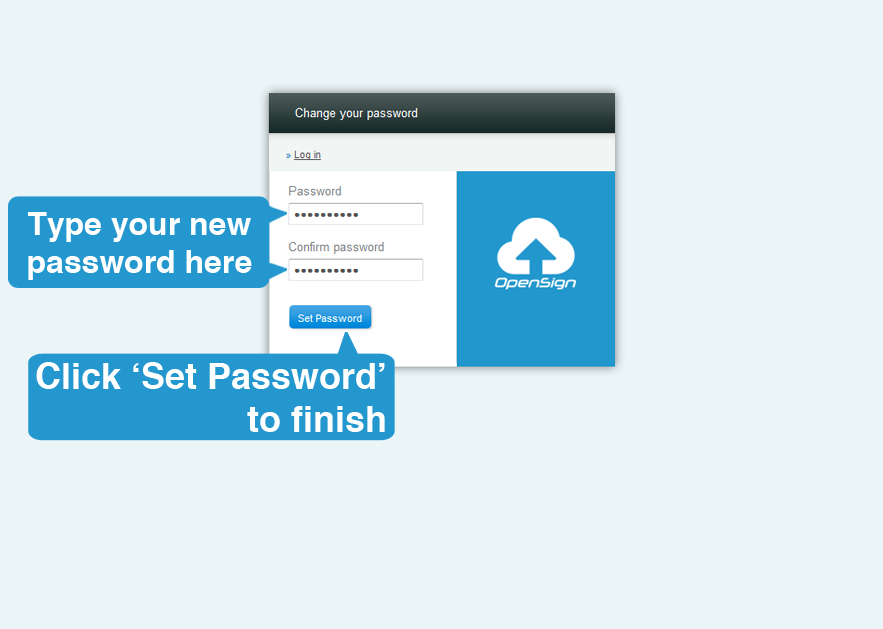
6. Click on the "Set Password" button.
You're all set! You will be brought back to your dashboard and you may now enjoy using this digital marketing platform.