File names in Publisher are used as ALT tags of images (files). ALT Tags are important for two uses: accessibility and search engine optimisation. File names are beneficial for easy management of files within Publisher while the ALT tags or the “alternate text” attribute is used for search engine indexers.
A descriptive, relevant file name and alternate text will help search engines determine what an image is about. The “alt” attribute provides a text description of the images in a website. Accurate naming and clear alternate texts could also potentially bring valuable traffic to the site through the image search engines.
While file names and ALT texts may not directly help in ranking a website, these elements improve user experience and website search engine indexing. In this day of digital marketing and SEO, websites with optimised pages will have the best chance to rank high in search engine rankings.
To learn more how and why you should use the alternate text on images, Google Webmaster Central released a video showing Matt Cutts discussing how to smartly implement the attributes. Matt Cutts is the head of Google’s webspam team.
You may also refer to the resources listed below to know more about proper use of file names and ALT text, and its benefits to SEO.
Resources:
- http://googlewebmastercentral.blogspot.com.au/2007/12/using-alt-attributes-smartly.html
- http://www.w3schools.com/tags/tag_img.asp
- http://www.wpromote.com/blog/seo/image-alt-vs-title-using-alt-title-attributes-in-image-tags/
- http://moz.com/beginners-guide-to-seo/how-search-engines-operate
- http://blog.woorank.com/2013/01/image-alt-text-relevant-for-seo-and-usability/
- http://www.searchenginejournal.com/image-alt-text-vs-image-title-whats-the-difference/
Where does the hover text name pull from in this screen shot of the hero image?
The hover text is the alt text for the image. This defaults to the filename on upload. It is editable in Publisher as below.
+ Find the file in Files;
+ Double click to open;
+ Change the Title field and save;
+ Republish websites using the image using Edit navigation/Publish.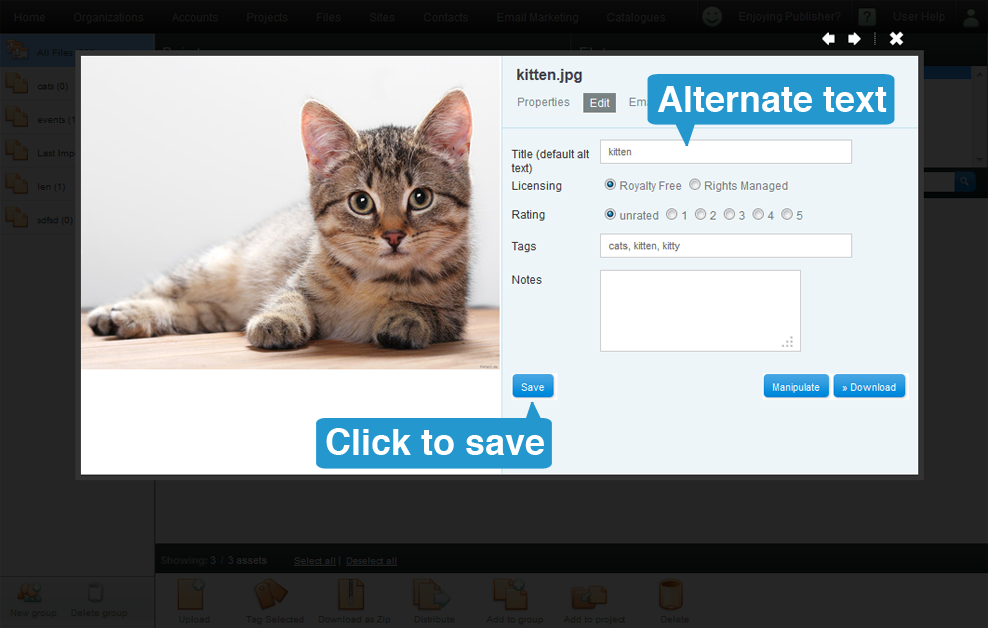
Because of the usability issues we have not widely publicised the functionality. We are looking to make this more usable soon.